

You’re sitting at the desk in your Spring Valley home — maybe near the intersection of Jones and Flamingo, maybe in one of the gated communities off Rainbow Boulevard, maybe in the older neighborhoods south of Sahara along Decatur — and you’re waiting. Waiting for the browser to open. Waiting for Outlook to load. Waiting for the login screen to appear after you typed your password forty-five seconds ago. The spinning wheel on the screen has become so familiar it feels like the computer’s default state. You click something, get up to pour coffee, come back, and it still hasn’t finished loading. The machine that used to turn on in thirty seconds now takes four minutes to reach the desktop. Programs freeze. Tabs crash. You’ve started closing Chrome entirely and reopening it just to reclaim enough memory to run one task at a time. The computer isn’t technically broken — it turns on, it runs — but using it feels like wading through wet concrete.
I’m Matt with Matt’s Mobile Tech Support, and Spring Valley is one of my busiest service areas in the Las Vegas metro. After 10+ years of in-home tech work across Clark County, I’ve repaired slow computers in Spring Valley homes ranging from compact condos near the Springs Preserve to large family homes off Fort Apache and Tropicana. Slow computer repair in Spring Valley is the single most common call I get — and it’s almost always fixable in a single visit for a fraction of the cost of a new machine. This guide walks through why your Spring Valley computer slowed down, what gets worse the longer you wait, and exactly how I diagnose and fix it at your desk in one afternoon.
Why Your Spring Valley Computer Got So Slow
Spring Valley is one of the most densely populated communities in the Las Vegas metro — over 200,000 residents — and the computer problems I see here follow consistent patterns. The machines aren’t defective. They’re overwhelmed, outdated in one key area, or running software configurations that have accumulated years of digital clutter. Here are the real reasons your Spring Valley computer is dragging:
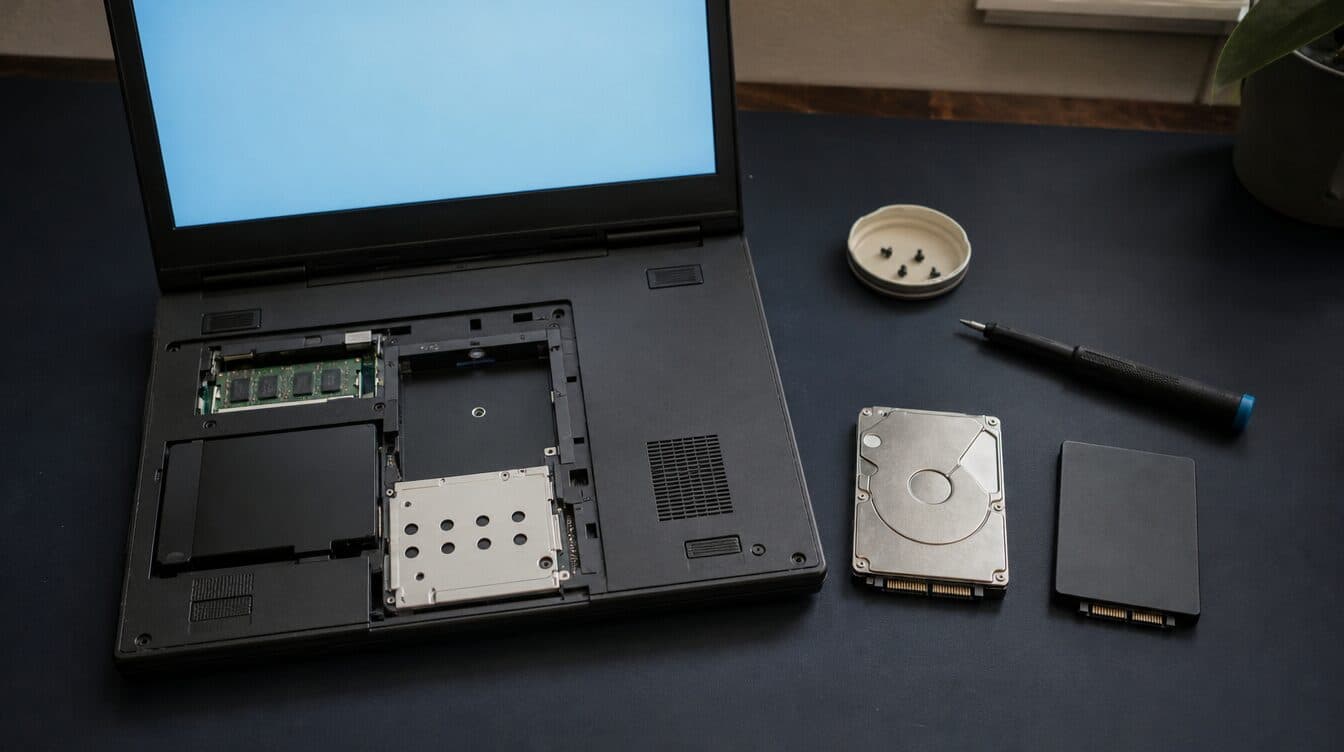
- You’re still running a mechanical hard drive. This is the number-one cause of slow computers I find in Spring Valley homes. If your machine is more than three or four years old, there’s a strong chance it shipped with a traditional spinning hard drive (HDD). These drives read data at roughly 80–120 MB/s. A modern solid-state drive (SSD) reads at 500–3,500 MB/s. That’s not a minor upgrade — it’s the difference between a four-minute boot time and a fifteen-second one. The operating system, every program launch, every file save, every search — all of it bottlenecks on that mechanical drive. Swapping it for an SSD transforms the same computer into a machine that feels brand new.
- Not enough RAM for how you use the computer. Many Spring Valley homes have computers with 4 GB of RAM — the bare minimum Windows 10 or 11 will accept. With Chrome open (which alone can consume 2–4 GB with a handful of tabs), plus Outlook, plus a PDF, plus a Zoom call, the system runs out of physical memory and starts swapping to the hard drive. On a mechanical drive, that swap is agonizingly slow. On an SSD it’s tolerable but still not ideal. Upgrading to 8 or 16 GB of RAM eliminates the bottleneck for most household use cases.
- Startup programs have multiplied. Every software installer quietly adds itself to the startup list. Over two or three years, a typical Windows machine accumulates 15–30 startup programs: Spotify, OneDrive, Adobe updater, printer monitor, VPN client, antivirus, cloud backup, HP support assistant, Skype, Teams, Java updater, graphics driver panel, and a dozen more. Each one loads at boot, consuming RAM and CPU cycles. Most of them don’t need to run at startup. Cleaning the startup list alone can cut boot times in half.
- Malware or adware is running in the background. You don’t need a dramatic virus alert to have malware. The most common infections I remove in Spring Valley homes are browser hijackers, adware bundles, and crypto miners — programs that run silently, consume CPU and network bandwidth, inject ads into webpages, and redirect searches. The computer gets slower and slower and the user thinks it’s just aging. It’s not aging; it’s infected.
- Windows updates have been failing or stacking. When Windows Update fails mid-install, the partially applied update can corrupt system files, create temp file bloat, and trigger retry loops that consume disk I/O in the background. I regularly find Spring Valley computers with 10–15 GB of failed update cache clogging the drive, background update processes running constantly, and error logs that have been silently growing for months.
- Thermal throttling from dust and desert heat. Spring Valley sits in the Mojave Desert. Homes run air conditioning heavily, but the air circulating through vents carries fine dust that settles inside computer cases and laptop vents. Over a few years, the heatsink and fan assembly on a CPU becomes insulated with a felt-like layer of dust that blocks airflow. The CPU overheats and throttles itself — running at 60–70% of its rated speed to prevent damage. The computer isn’t slow because the processor is old; it’s slow because the processor is hot.
The common thread: Spring Valley slow-computer problems are almost never about the CPU being too old or the computer reaching “end of life.” They’re about one or two specific bottlenecks — the drive, the RAM, the startup load, the malware, the thermals — that can be identified and fixed without replacing the entire machine.
What Happens When You Keep Tolerating a Slow Computer
Here’s what happens when Spring Valley residents keep tolerating a slow machine:
- You lose hours every week to waiting. Two minutes here, three minutes there — it doesn’t feel like much in the moment, but a slow computer adds up to 30–60 minutes of wasted time per day for regular users. Over a month, that’s 15–30 hours of your life spent staring at spinning wheels. The cumulative cost of a slow computer far exceeds the cost of fixing it.
- You start avoiding the computer entirely. You check email on your phone instead of replying properly from the desktop. You skip video calls because the computer can’t handle Zoom without freezing. You stop printing because opening the document takes too long. You stop managing finances in QuickBooks because it crashes. The computer becomes a piece of furniture you walk past instead of a tool you use.
- Small problems compound into data-loss risks. A hard drive that’s slow today is a hard drive that’s failing tomorrow. Mechanical drives have moving parts — spinning platters, read/write heads — that wear out. The warning signs of imminent failure look exactly like “it’s just getting old”: slow reads, hanging file operations, occasional freezes. By the time the drive clicks and won’t boot, the data is often unrecoverable. Every week you delay the SSD upgrade is a week your irreplaceable files sit on a degrading drive.
- You spend $800 on a new machine you didn’t need. The most expensive slow-computer “fix” is buying a replacement. I see Spring Valley residents ready to spend $700–$1,000 on a new laptop when their current machine needs a $75 SSD and a 30-minute cleanup. A proper diagnosis saves hundreds of dollars and avoids the hassle of migrating everything to a new system.
- Malware has more time to do damage. If adware or a background crypto miner is part of the slowdown, every day it runs is a day it’s harvesting browsing data, injecting ads, or consuming electricity and bandwidth. Some infections escalate — browser hijackers can redirect banking sites, adware can download additional payloads, and cryptominers can cause hardware wear from running the CPU at 100% continuously.
The real cost of a slow computer isn’t measured in megahertz or gigabytes. It’s measured in time lost, tasks avoided, and risks accumulating while you wait.
In-Home Slow Computer Repair in Spring Valley
Here’s how a slow-computer appointment works when I come to a Spring Valley home.
1. Call, text, or book online
Reach me at (702) 829-6914 by call or text, or book online. Tell me what’s happening: “it takes forever to boot,” “Chrome keeps freezing,” “everything is slow,” “it’s been getting worse for months.” I’ll ask a few questions — how old the computer is, whether it’s a desktop or laptop, what you mainly use it for — and schedule a visit. Spring Valley is one of my core service areas and I’m in the neighborhood multiple times a week. Same-day appointments are usually available if you reach out before noon.
2. Full diagnostic at your desk
When I arrive, I sit down at your computer in your actual setup — your desk, your WiFi, your peripherals, your typical workflow. I run a full diagnostic that covers:
- Drive health and type: Is it an HDD or SSD? What’s the SMART status? How full is it? What’s the actual read/write speed?
- RAM usage: How much is installed? How much is in use at idle? Is the system swapping to disk?
- Startup audit: How many programs load at boot? Which ones are consuming the most resources? Which ones don’t need to be there?
- Malware scan: Professional-grade scan for viruses, adware, browser hijackers, PUPs, and crypto miners. Not the built-in Windows Defender quick scan — a deep sweep with multiple tools.
- Thermal check: CPU and GPU temperatures under load. Fan speed and airflow. Dust accumulation in vents and heatsinks.
- Windows health: Update status, system file integrity, event logs for recurring errors, disk cleanup opportunities.
Within 20–30 minutes, I know exactly what’s causing the slowdown and I explain it in plain language — no jargon, no scare tactics, just a clear explanation of what’s wrong and what it takes to fix it.
3. The fix — usually in a single visit
Based on the diagnostic, here’s what a typical slow-computer repair looks like in Spring Valley:
- SSD upgrade (most common): I clone your existing hard drive — Windows, programs, files, settings, everything — to a new SSD using professional cloning tools. When the clone finishes, I swap the drives and the computer boots in seconds instead of minutes. Your desktop looks exactly the same, all your files are there, all your programs work. The only difference is speed. The old drive gets handed back to you as a backup.
- RAM upgrade: If the machine has 4 GB and you’re running Chrome with multiple tabs, I install 8 or 16 GB. The upgrade takes five minutes on a desktop, fifteen on most laptops. Immediate improvement in multitasking and program switching.
- Startup optimization: I disable unnecessary startup programs, remove bloatware, configure services for optimal performance, and set up a clean boot profile. Boot times drop and the machine reaches a usable desktop faster.
- Malware removal: Full infection cleanup — removal of all identified threats, browser reset, extension audit, DNS and hosts file check, account security review. If passwords may have been compromised, I walk you through changing the critical ones.
- Thermal cleaning: I open the case or laptop chassis, clean dust from fans and heatsinks, reapply thermal paste if needed, and verify temperatures return to normal under load. The CPU stops throttling and runs at its full rated speed.
- Windows repair: System file checker, pending update resolution, temp file cleanup, disk optimization. Resolves the background processes that silently consume resources.
Residential labor is a flat $125/hour ($150 for businesses) and parts like SSDs and RAM are at cost — no markup.
4. Every service — all at your home
- Slow computer repair — SSD upgrades, RAM, startup optimization (the core of this visit)
- Virus and malware removal — full PC and Mac cleanup, browser repair, account lockdown
- WiFi setup, mesh networks, and dead-zone fixes
- Printer repair and setup — wireless reconnects, driver fixes, multi-device sharing
- New computer setup and data migration
- Smart-home setup — cameras, doorbells, thermostats, voice assistants, guest networks
- Hardware repair, email setup, password recovery, two-factor authentication walkthroughs
I service PCs and Macs equally — Windows 10, Windows 11, current and older macOS versions. Desktops, laptops, all-in-ones. If it’s slow and it sits in your home, I fix it at your home.
Share the Tech Relief — Refer a Spring Valley Neighbor, Save $25 Each
If your computer goes from four-minute boot times to fifteen seconds and your neighbor at the Desert Breeze soccer fields mentions their laptop “takes forever to do anything,” send them my way. When you refer a Spring Valley neighbor, family member, or coworker to Matt’s Mobile Tech Support and they book their first appointment, both of you get $25 off your next service. No app, no code, no expiration. Have them mention your name when they call (702) 829-6914, and I credit your account on the next visit.
Spring Valley is a tight-knit community with neighbors who talk — at the Springs Preserve, at the Durango Hills YMCA, at the school pickup line. Most of my Spring Valley schedule fills through word of mouth. Share the tech relief, get $25 off, and help a neighbor stop tolerating a computer that should’ve been fixed months ago.
Frequently Asked Questions About Slow Computer Repair in Spring Valley
Do you work on PCs and Macs?
Yes — both. Windows 10 and 11 PCs, current and older macOS versions, plus Chromebooks and Linux setups. SSD upgrades, RAM installs, and performance optimization apply to all platforms. The residential rate is $125/hour regardless of whether you’re running Windows or macOS, desktop or laptop.
How quickly can you get to a Spring Valley address?
Spring Valley is one of my core service areas — I’m in the neighborhood multiple times a week, covering everything from the communities near Jones and Flamingo to the homes off Fort Apache and Tropicana, the streets along Decatur and Rainbow, and the gated neighborhoods near Desert Breeze Park. Same-day appointments are usually available if you call or text before noon. I’ll give you a confirmed arrival window so you’re not waiting around.
Will I lose my files if you upgrade the hard drive?
No. I clone the entire existing drive — Windows, programs, files, settings, desktop shortcuts, browser bookmarks, everything — to the new SSD. When the swap is done, your computer looks and works exactly the same as before, just dramatically faster. Your old drive gets handed back to you as a built-in backup. Nothing is lost in the process.
How does the Share the Tech Relief referral program work?
Refer a friend, family member, or neighbor. When they book and complete their first appointment with Matt’s Mobile Tech Support, you each get $25 off your next visit. The credit doesn’t expire and there’s no limit on how many people you can refer. Just have them mention your name when they call (702) 829-6914 and the discount applies automatically.
Ready to Make Your Spring Valley Computer Fast Again?
You don’t need to buy a new machine. You don’t need to haul the desktop to a shop and wait a week. Most slow computers in Spring Valley — the ones that take minutes to boot, freeze during video calls, and make Chrome feel like dialup — have one or two specific bottlenecks that can be diagnosed and fixed in a single in-home visit. An SSD upgrade, a RAM install, a startup cleanup, a malware removal — the right fix depends on the diagnostic, and the diagnostic happens at your desk.
📞 Call or text Matt at (702) 829-6914 for in-home slow computer repair in Spring Valley, NV, or book online. SSD upgrades, RAM installs, malware removal, startup optimization — all at your home, all in one visit. And if a friend already sent you my way, mention their name so they get their $25 Share the Tech Relief credit too.